Giving Ratings
After a match you can rate both teams and individual players. Ratings feed into your statistics, giving you insight into performance over time.
Accessing ratings
After ending a match, you land on the match statistics screen (or open a played match from the match list). Tap Ratings in the bottom navigation.
Rating a team
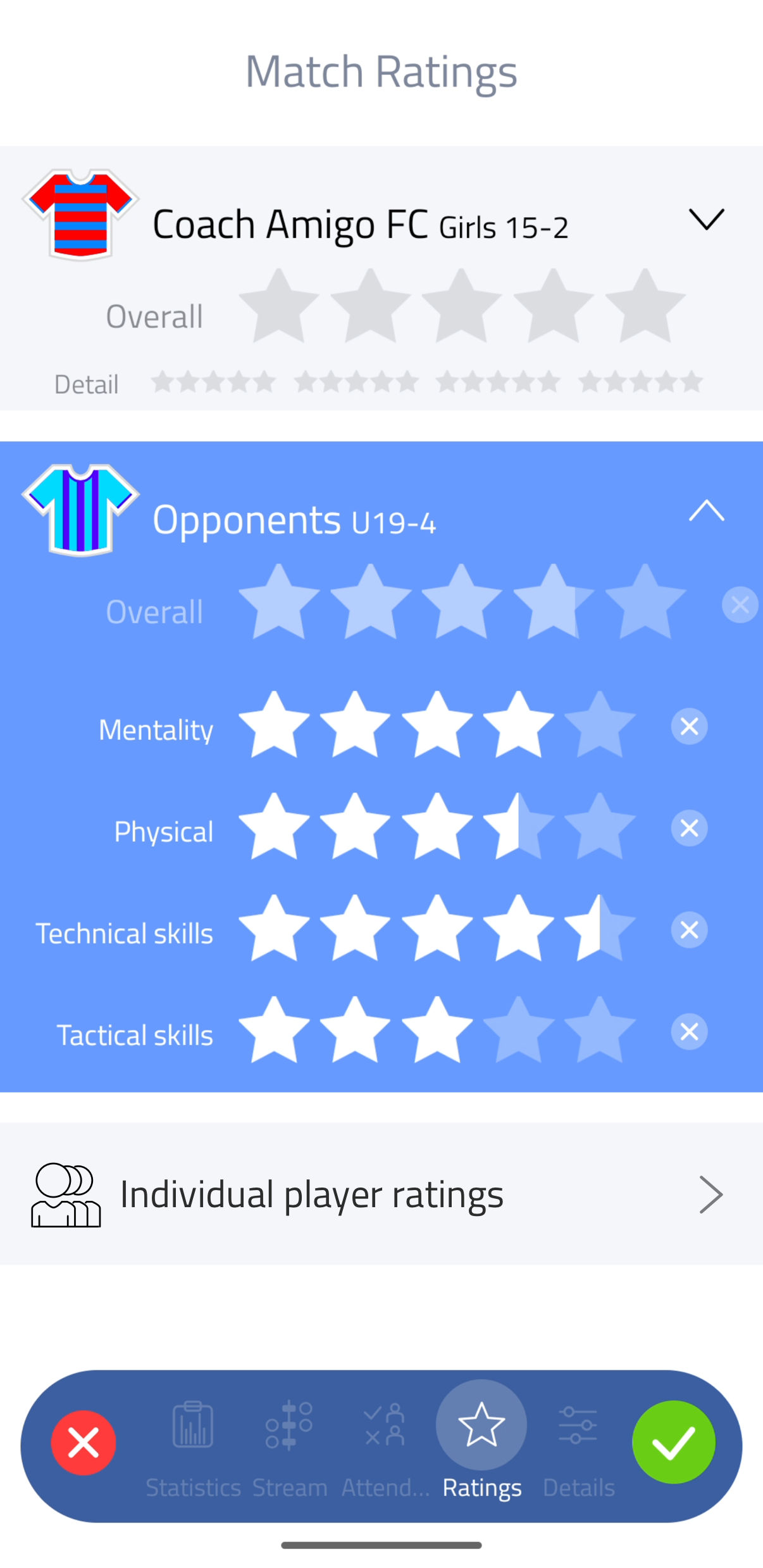
For each team, tap one of the Overall stars to set a rating. Tap the same star again for a half star. Tap the cross next to the stars to remove the rating.
Detailed ratings
Tap the arrow icon next to a team to expand its detailed ratings. This reveals four attributes, each rated independently using the same star system:
- Mentality - attitude, effort, focus
- Physical - fitness, stamina, strength
- Technical skills - ball control, passing, shooting
- Tactical skills - positioning, awareness, decision making
If you remove the Overall rating (tap its cross), Coach Amigo calculates it automatically as the average of the four detail ratings.
Rating individual players
Tap Individual player ratings to open the players list. Give each player a quick Overall rating by tapping the stars, or expand a player to refine the rating using the same four attributes.
Saving your ratings
Tap the green checkmark to save.
Viewing ratings in statistics
All ratings are included in your team statistics. You can view average ratings per player across matches and filter by period to track progress over a season.